How to Install MCP in Claude, Cursor and VS Code
Step-by-step guide to installing MCP in Claude, Claude Code, Cursor and VS Code: create a key, add a connector, edit mcp.json, test it and fix errors.
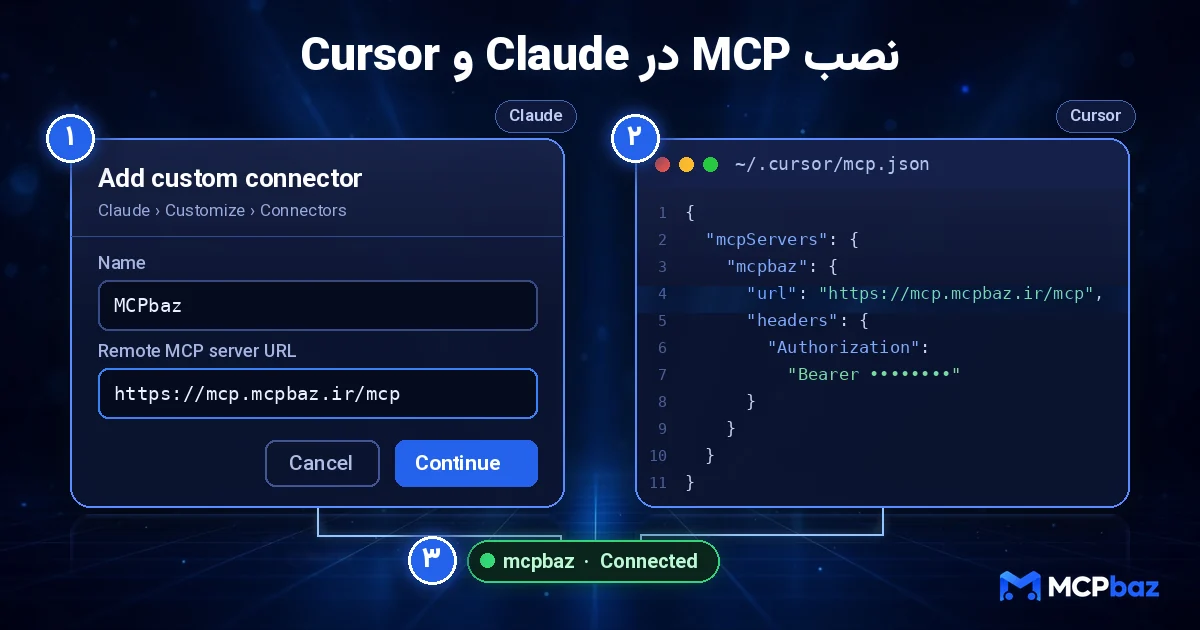
Installing MCP means giving your AI app the URL (or launch command) of an MCP server. The simplest route is a remote server: in Claude, add a custom connector under Customize › Connectors; in Cursor, put the URL in ~/.cursor/mcp.json; in VS Code, add an HTTP server from Chat: Open Customizations › MCP Servers. With the MCPbaz router, every Iranian service sits behind one URL: https://mcp.mcpbaz.ir/mcp.
Steps checked against the official Claude, Cursor and VS Code documentation on November 21, 2026. Menus change often; if a label differs, look for Connectors or MCP in settings.
Remote vs local servers
Remote (HTTP) | Local (stdio) | |
|---|---|---|
Runs on | The provider's server or a router | Your own computer |
You need | A URL plus a key or OAuth sign-in | Node.js or Python plus a launch command |
Works in Claude web and mobile | Yes | No |
Best for | Most users | Developers and private servers |
New to the concepts? Read What is MCP? first.
Step 0: create a key in the MCPbaz router
- Open the router page and pick services, for example Digikala and TGJU gold & currency, which need no credentials.
- If a service needs connection details (a Zarinpal merchant ID, a Bale bot token), enter them there.
- Create an API key and store it safely. It is shown only once; if you lose it, create a new one.
Replace YOUR_MCPBAZ_KEY below with your key.
Claude (web, desktop and mobile)
- Go to Customize › Connectors.
- Click + Add, then Add custom connector.
- Enter a name (e.g. MCPbaz) and the URL
https://mcp.mcpbaz.ir/mcp, then Continue. - Under Authentication choose No sign in.
- Under Request headers add
Authorizationwith the valueBearer YOUR_MCPBAZ_KEY, then click Add. - In a chat, use the + button › Connectors to enable it for that conversation.
From Claude's own documentation: custom connectors work across web, desktop and mobile; free users get one custom connector; and the connection is made from Anthropic's cloud, so the server must be publicly reachable on port 443. On Team and Enterprise plans an owner adds the connector and members click Connect.
Alternative: claude_desktop_config.json
- macOS:
~/Library/Application Support/Claude/claude_desktop_config.json - Windows:
%APPDATA%\Claude\claude_desktop_config.json
Connecting a remote server from this file uses mcp-remote, which needs Node.js:
{
  "mcpServers": {
    "mcpbaz": {
      "command": "npx",
      "args": ["-y", "mcp-remote", "https://mcp.mcpbaz.ir/mcp", "--header", "Authorization:${MCPBAZ_AUTH}"],
      "env": { "MCPBAZ_AUTH": "Bearer YOUR_MCPBAZ_KEY" }
    }
  }
}
Fully quit Claude Desktop (not just the window) and reopen it.
Claude Code
claude mcp add --transport http mcpbaz https://mcp.mcpbaz.ir/mcp --header "Authorization: Bearer YOUR_MCPBAZ_KEY"Cursor
Quick way: on the router page choose Cursor and click the one-click install button, then confirm in Cursor.
Manual way: create mcp.json at ~/.cursor/mcp.json (all projects) or .cursor/mcp.json (one project):
{
  "mcpServers": {
    "mcpbaz": {
      "url": "https://mcp.mcpbaz.ir/mcp",
      "headers": { "Authorization": "Bearer YOUR_MCPBAZ_KEY" }
    }
  }
}
The server appears on Cursor's Customize page, where you can toggle it. If it fails, open the Output panel (Cmd+Shift+U on macOS) and choose MCP Logs. Don't commit a project mcp.json that contains your key; keep personal keys in the global file.
VS Code (GitHub Copilot)
- In a Copilot chat session, run Chat: Open Customizations from the Command Palette and select MCP Servers.
- Click Add Server (+), choose HTTP and enter
https://mcp.mcpbaz.ir/mcp. - Give it an ID such as
mcpbaz. - Choose Global › Copilot Global.
- Add the auth header. VS Code recommends environment-variable references over literal keys. The personal file
~/.copilot/mcp-config.jsonlooks like this:
{
  "mcpServers": {
    "mcpbaz": {
      "type": "http",
      "url": "https://mcp.mcpbaz.ir/mcp",
      "headers": { "Authorization": "Bearer ${MCPBAZ_KEY}" }
    }
  }
}
Then define MCPBAZ_KEY in your operating system.
About .vscode/mcp.json: many tutorials and install buttons still write .vscode/mcp.json with a servers key. According to current VS Code docs, that format belongs to the deprecated Local harness, scheduled for removal in February 2027. Use the paths above for new setups.
Test the connection
Ask something only a tool can answer: "Using MCPbaz, what are today's Emami coin and dollar prices?" Then expand the tool call. If the assistant answered without calling a tool, it is not connected, however convincing the answer looks.
If it doesn't work
- 401 / Unauthorized: wrong key, or
Bearer(with a space) is missing before it. - Server not listed: fully restart Claude Desktop; check Customize in Cursor.
- JSON error: a single trailing comma stops the whole file from loading.
npxnot found: Node.js is missing from PATH. In Claude, use a custom connector instead, which needs no Node.js.
For Iran-specific issues (sanctions, proxies, VPN conflicts with Iranian sites, and IP allowlisting), see our guide on common MCP errors in Iran (in Persian).
Once connected, enable more services from the Iranian MCP server catalog in the router; you don't need to change your app's configuration again.
FAQ
Do I need Node.js or Python to install MCP?
No, not for remote servers. Claude custom connectors, Cursor and VS Code only need a URL and a key. Node.js is needed for local servers, or for the mcp-remote approach in Claude Desktop's config file.
Where is claude_desktop_config.json?
On macOS at ~/Library/Application Support/Claude/claude_desktop_config.json and on Windows at %APPDATA%\Claude\claude_desktop_config.json. Fully quit and reopen Claude Desktop after editing it.
Where does Cursor read mcp.json from?
~/.cursor/mcp.json for all projects, or .cursor/mcp.json inside a project for that project only. The file holds an mcpServers object.
Should I use .vscode/mcp.json in VS Code?
Not for new setups. Current VS Code docs point Copilot to ~/.copilot/mcp-config.json (personal) or a workspace-root .mcp.json, both using mcpServers. .vscode/mcp.json with a servers key belongs to the deprecated Local harness, scheduled for removal in February 2027.
How do I know the MCP server is really connected?
Ask a low-risk question that only a tool can answer, such as today's gold coin price via MCPbaz, then expand the tool call in the chat. A plausible answer without a tool call means the connection is not working.
Can I add a custom connector on Claude's free plan?
Yes, but Claude's help center says free users are limited to one custom connector. The MCPbaz router fits that limit because every service sits behind one URL.